
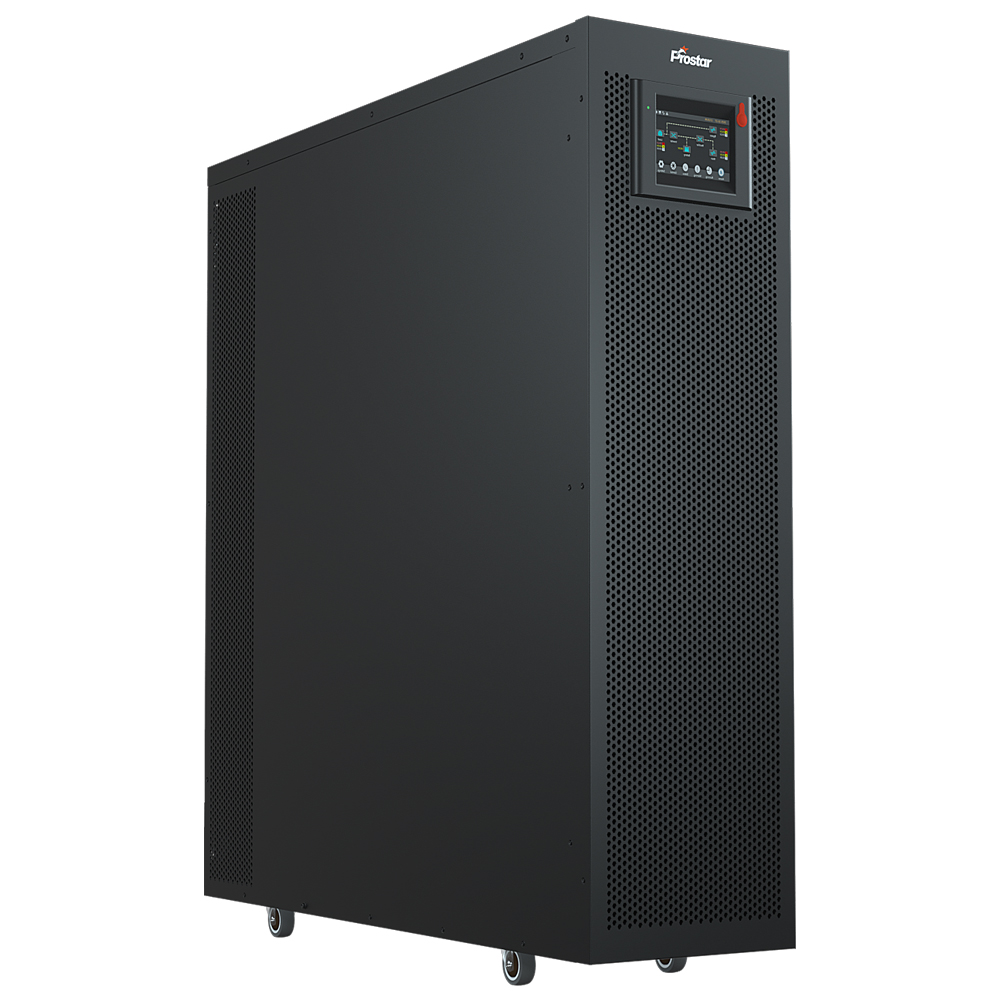
Prostar PET3330B three phase touch LCD 30kva ups battery backup power combines a transformerless, high-efficiency design with advanced protection. This 30kva ups battery backup has a true unity output power factor. It provides a full 30kW of usable real power. This is ideal for modern high-density IT environments and data centers. The online ups is also suitable for medical facilities, commercial buildings, and other demanding loads.
Utilizing true online double-conversion architecture, the 30kva ups battery backup continuously converts incoming AC power to DC and back to AC. This provides complete galvanic isolation from utility disturbances such as surges, sags, spikes, noise, and frequency variations. It ensures a stable, clean sine wave output. There is zero transfer time during power outages, offering seamless protection of sensitive equipment.


30kVA UPS Battery Backup Key Features
True Online Double Conversion Technology
Ensures continuous, clean, and fully isolated power by continuously converting input AC to DC and back to AC, protecting connected loads from all types of utility disturbances.
3-Phase Input / 3-Phase Output Design
Ideal for balanced three-phase loads in medical, commercial, and IT environments.
Wide Input Voltage and Frequency Range
Maintains stable operation under unstable grid conditions, reducing battery usage and extending battery life.
Parallel Operation Capability
Supports multiple units in parallel for capacity expansion or N+1 redundancy, enhancing system availability.
Transformerless High-Efficiency Design
Compact structure with reduced weight and higher efficiency, lowering energy consumption and total cost of ownership.
User-Friendly LCD Display and LED Indicators
Real-time monitoring of system status, alarms, and electrical parameters for easy operation and maintenance.
UPS Power Supply Connection Diagram
The online double-conversion UPS acts as the core of the system. It continuously converts incoming AC power to DC. Then it converts the DC back to clean, regulated AC power. This design fully isolates the load from input power disturbances such as voltage fluctuations, frequency variations, and electrical noise.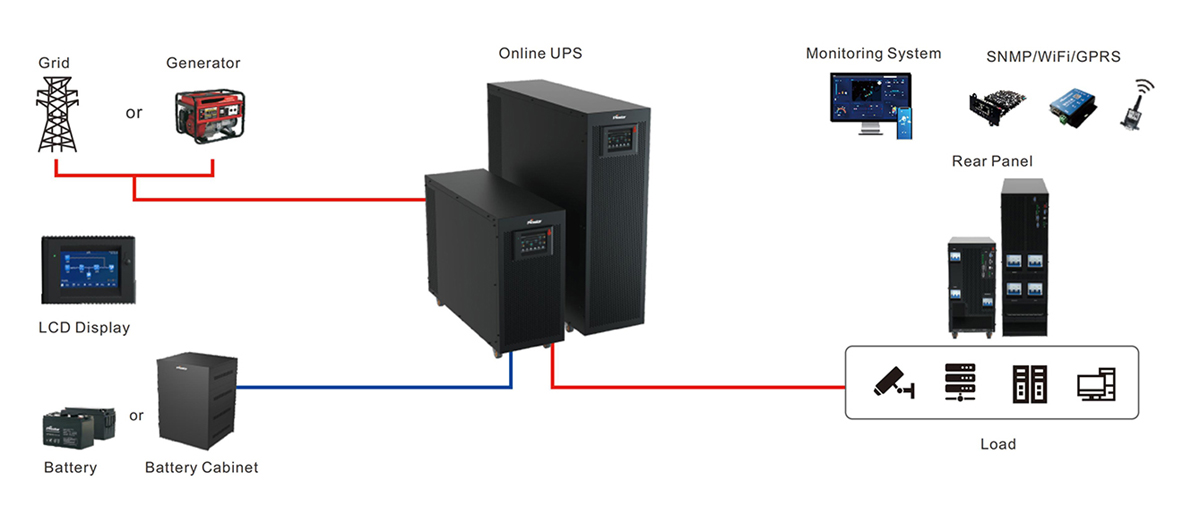

An external battery bank or battery cabinet is connected to the UPS to provide uninterrupted backup power during mains failure. The UPS automatically switches to battery mode without interruption, ensuring continuous operation of connected equipment.
The conditioned and regulated output power from the UPS is delivered to various critical loads. This includes servers, data centers, security systems, networking equipment, and industrial devices. This ensures maximum protection and reliability.
UPS Uninterrupted Power Supply Details
Rear Panel Shown
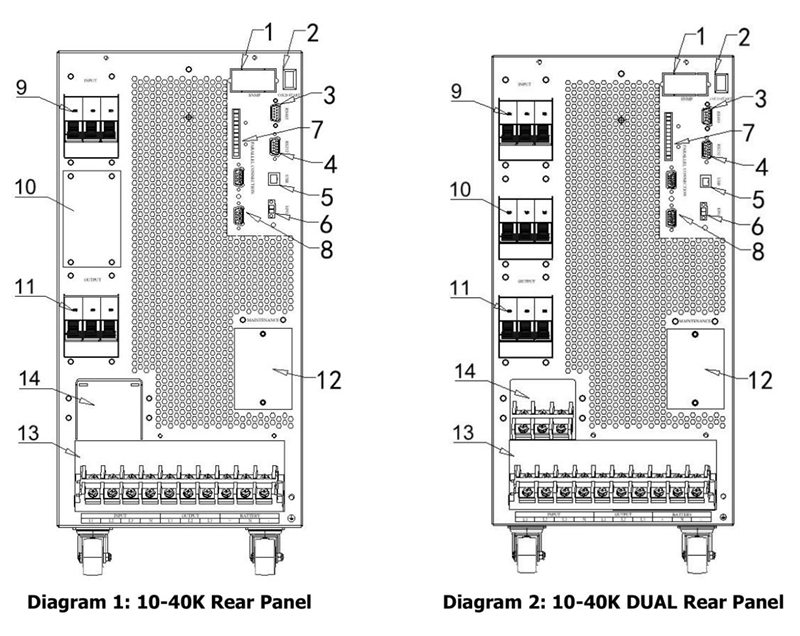

| 1. SNMP intelligent slot | 2. Cold start function | 3. RS485 communication port |
| 4. RS232 communication port | 5. USB communication port | 6. Emergency power off function connector |
| 7. Share current port(only for parallel model) | 8. Parallel port (only for parallel model) | 9. Line input circuit breaker/switch |
| 10. Manual bypass switch (10kVA – 40kVA optional configuration) | 11. Output switch | 12. Maintenance bypass switch |
| 13. Line connection terminal | 14. Bypass input terminal (10kVA-40kVA optional configuration) | 15. Battery switch |
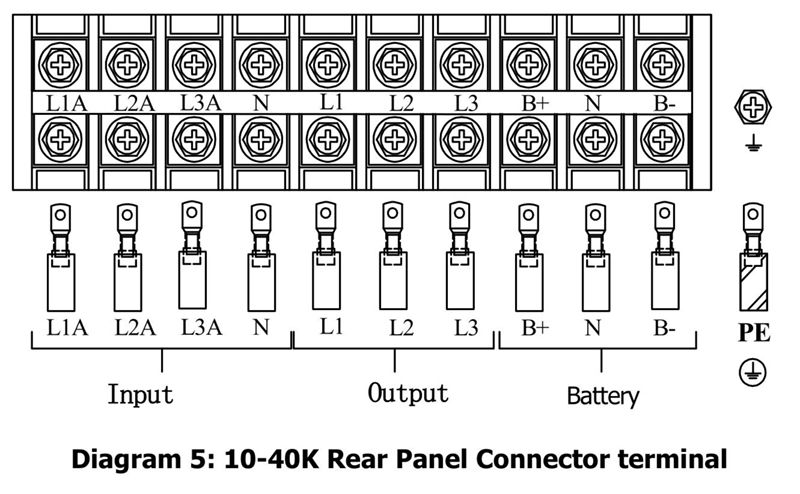
Rear Panel Connection Terminal

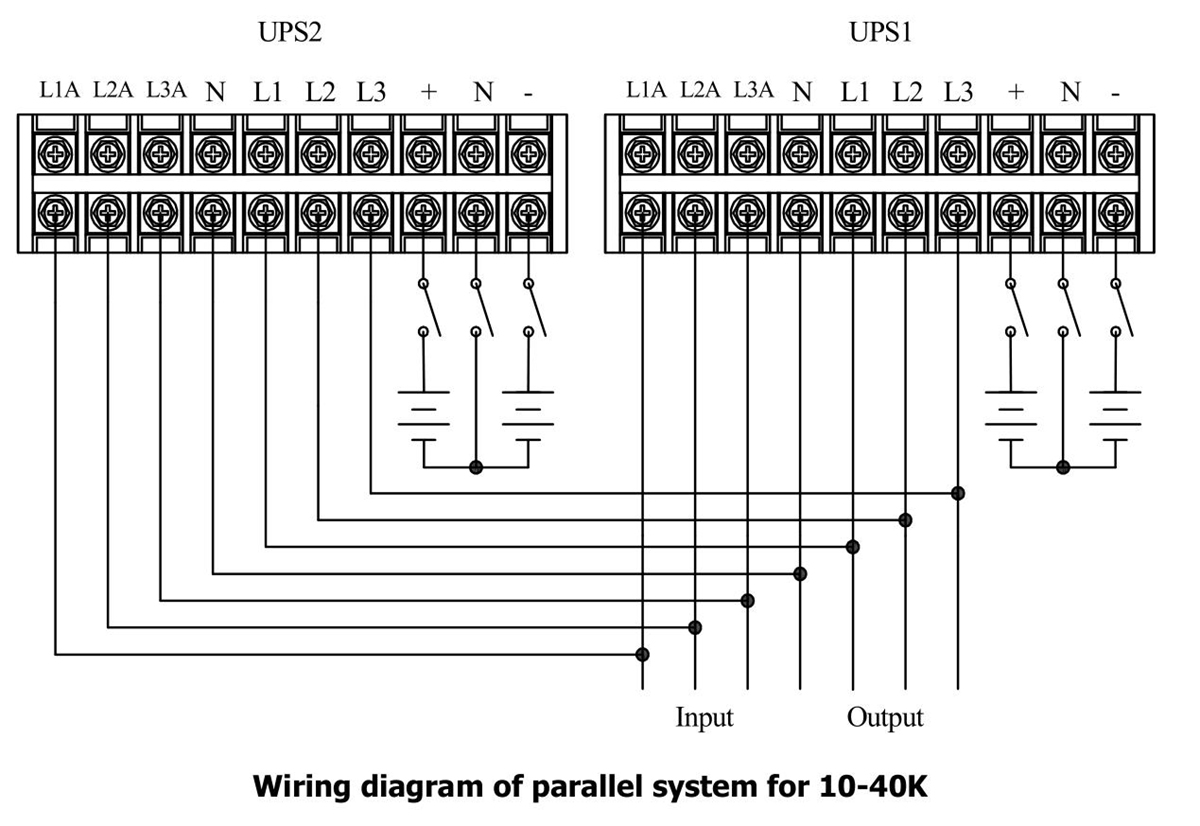
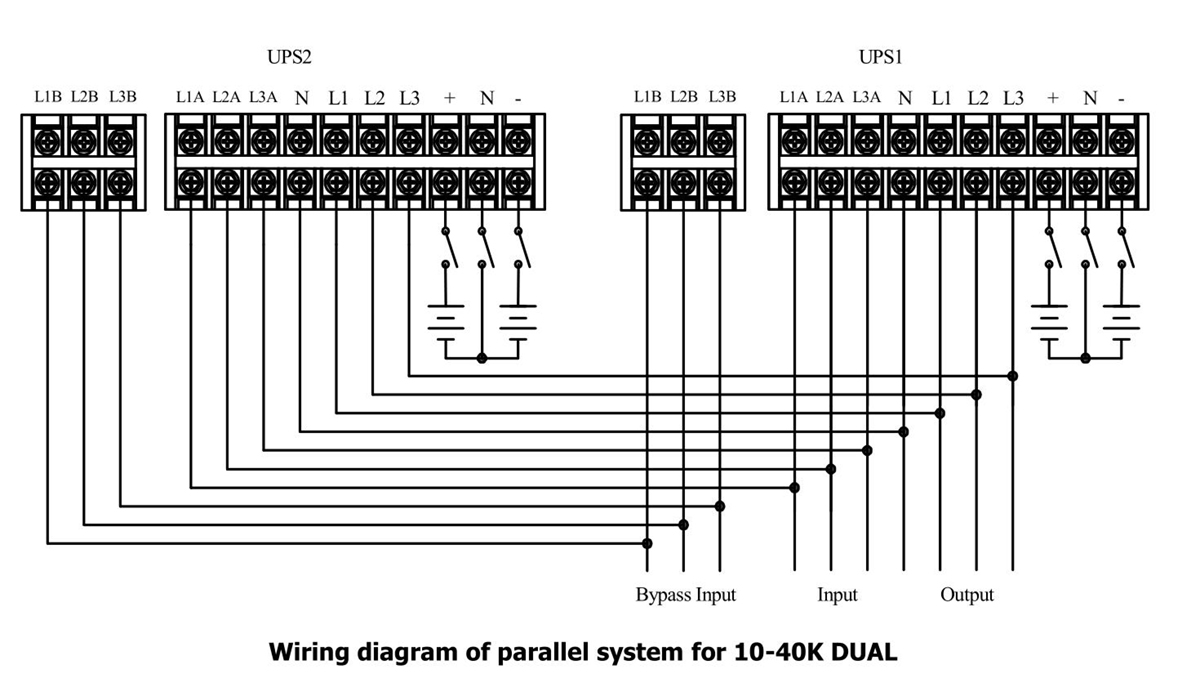
Parallel Wiring Diagram

Dual Input in Parallel Operation

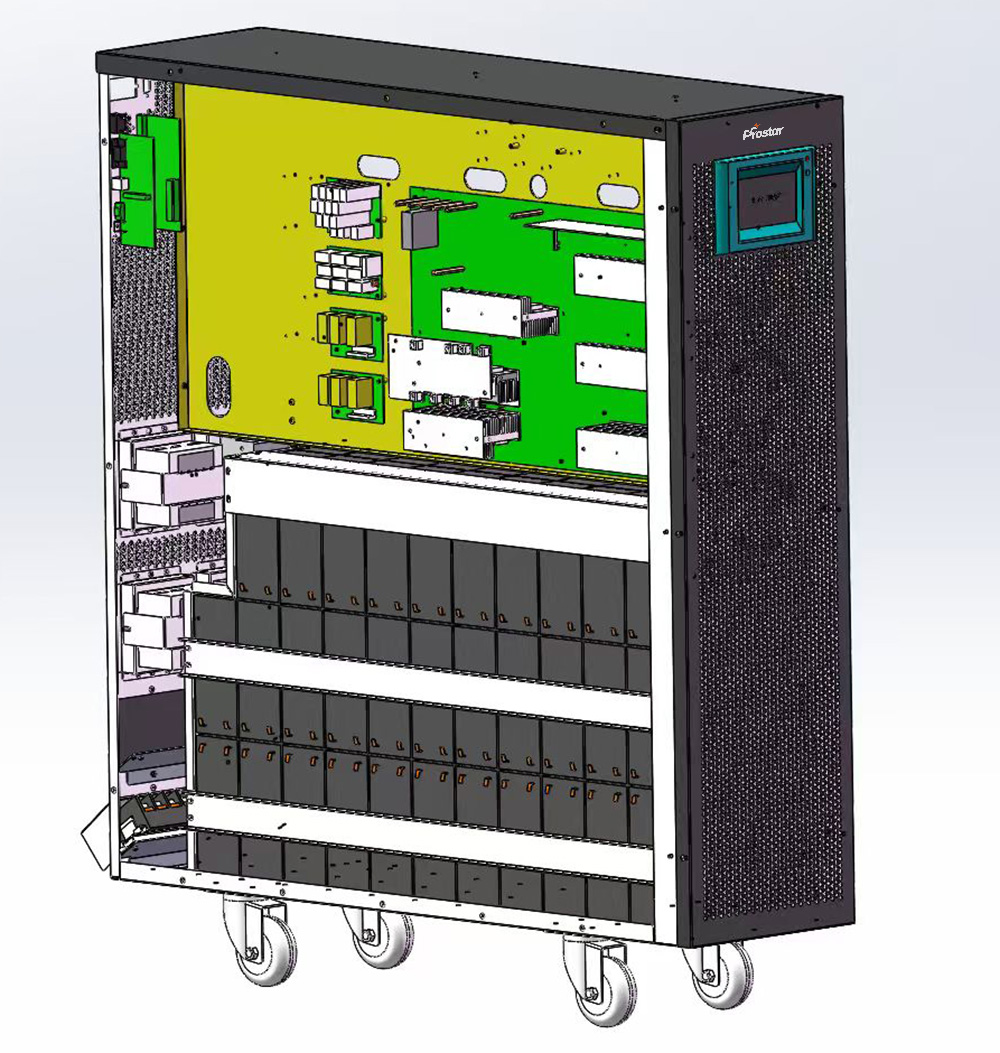
Built-in Battery Inside
30kVA UPS with 64 units 12V 9AH VLRA battery

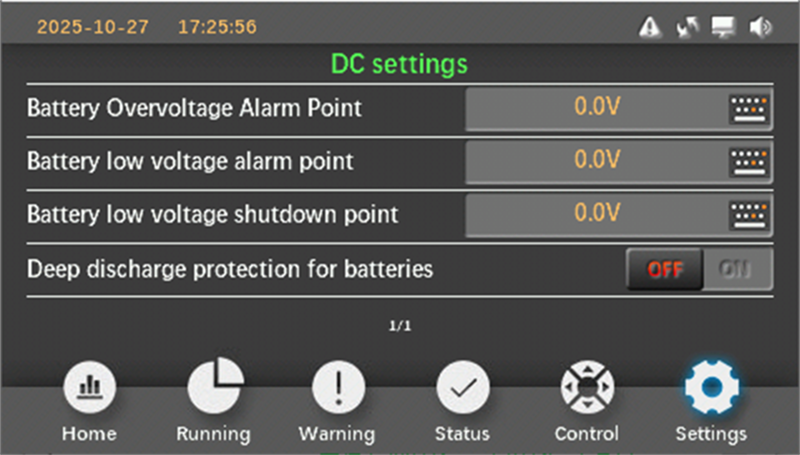
LCD Display
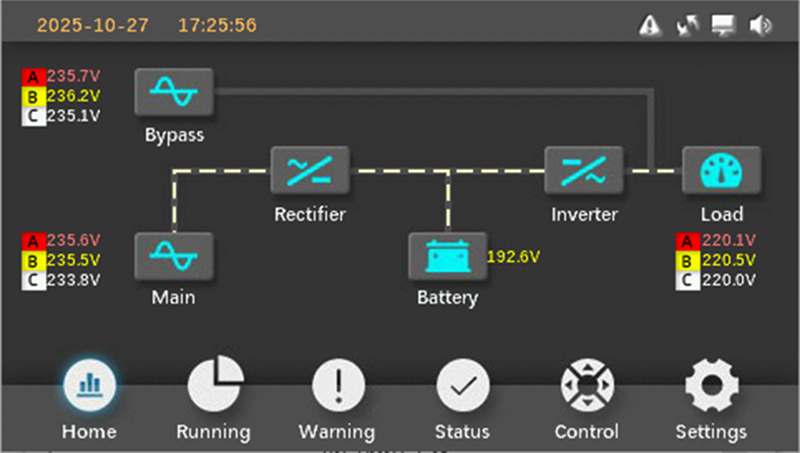

DC Settings Shown

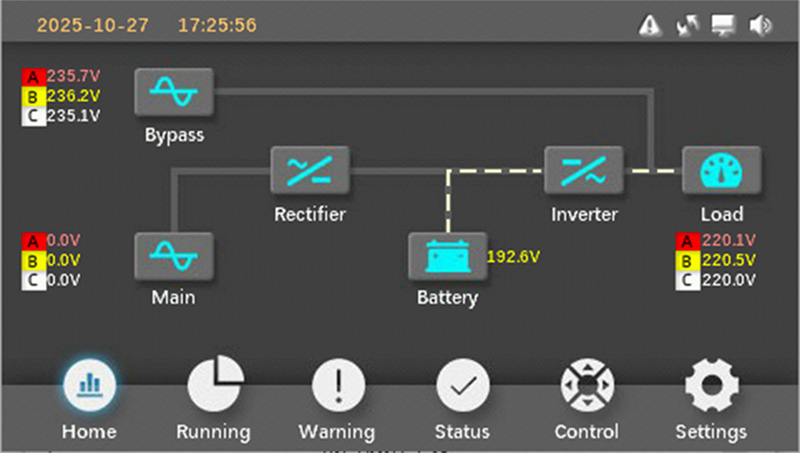
Battery Mode
UPS Specifications
Rated Capacity
-
Power Range: 30kVA/30kW
-
Output Power Factor: 1.0
AC Input
-
Input Phase: Three-phase (3P + N + PE)
-
Nominal Voltage: 380 / 400 / 415 Vac
-
Voltage Range: 110Vac – 300Vac (P-N)
-
Frequency: 50 / 60 Hz (auto-sensing)
-
Power Factor: ≥ 0.99
-
Input THDi: ≤ 3%
AC Output
-
Output Phase: Three-phase (3P + N + PE)
-
Output Voltage: 380 / 400 / 415 Vac
-
Voltage Regulation: ±1%
-
Frequency Accuracy:
-
Utility mode: synchronized to input
-
Battery mode: ±0.1Hz
-
-
Waveform: Pure sine wave
-
Total Harmonic Distortion (THDv):
-
Linear load: ≤ 2%
-
Non-linear load: ≤ 5%
-
Battery
-
Battery Type: VRLA / External battery bank
-
Battery Configuration: Built-in 32x12V 9AH VRLA Battery x 2 Groups
-
Charging Method: Intelligent multi-stage charging
Parallel Operation
-
Parallel Capability: Up to 4 units
-
Parallel Mode: Capacity expansion or N+1 redundancy
Communication & Monitoring
-
Display: LCD + LED indicators
-
Standard Interface: RS232 / RS485 / USB
-
Optional Interface: SNMP, WiFi, GPRS, Dry Contact
-
Monitoring: Local and remote real-time monitoring
Mechanical
-
Design: Transformerless, high-frequency
-
Installation: Tower / Cabinet type
-
Cooling: Intelligent forced air cooling
-
Protection Level: IP20
- Dimension: 250x828x863mm
Step-by-Step Installation Guide
1. Unpacking and Inspection
Carefully unpack the UPS on a stable surface. Check for shipping damage (dents, scratches, loose parts). Verify all accessories: user manual, parallel cables (if applicable), communication cables, mounting hardware, and terminal covers. Report any issues to the supplier immediately. Do not install a damaged unit.
2. Site Preparation and Placement
- Select a level, stable floor capable of supporting the UPS weight.
- Ensure minimum clearances for ventilation and service access.
- Position the UPS for easy front access to the touch LCD panel and rear/bottom/top cable entry.
- If floor-standing, secure with anchor bolts if required by local seismic codes.
3. Electrical Preparation
- Confirm input: 3-phase + neutral + PE (380/400/415V typical, wide range tolerance).
- Output: 3-phase + neutral + PE.
- Install upstream protective devices: suitable MCCB or fuse for input (rated for full load current + inrush), bypass line (if dual input used), and output distribution.
4. Power Connections (Input, Output, Battery, Ground)
- Open the rear or bottom access panel to expose input/output/battery terminals (typically busbar style).
- Grounding (PE): Connect protective earth first—use the dedicated PE terminal/bolt. Ensure low-impedance grounding to building ground.
- Input (L1, L2, L3, N): Connect 3-phase input cables. Tighten terminals to manufacturer torque values (typically 20–40 Nm for M8–M12 bolts; check exact label).
- Output (L1, L2, L3, N): Connect to critical load distribution panel.
- Battery (+ and –): Built-in battery inside, no need to prepare extra battery bank.
- For parallel systems: Connect parallel communication cables (share current / parallel ports) between units before powering on.
5. Optional Connections
- EPO (Emergency Power Off): Connect dry contact if required.
- SNMP/monitoring card slot (if equipped): Install optional card for remote monitoring.
- Dry contacts / RS232 / USB for BMS integration.
6. Final Checks Before Power-Up
- Double-check all connections for tightness, correct polarity, and phase sequence (use phase rotation meter).
- Verify no tools or debris left inside cabinet.
- Close all panels and secure covers.
7. Initial Power-Up and Commissioning
- Close upstream input breaker → UPS starts in bypass or online mode (LED/LCD indicates status).
- Connect batteries last: close battery breaker → UPS detects DC voltage and may charge batteries.
- Use the touch LCD to enter setup menu: set date/time, language, equalization charge if needed, parallel mode (if applicable).
- Perform battery test via LCD menu.
- Transfer to online mode (inverter on).
- Gradually apply load and monitor for alarms.
- For parallel setups: Follow Prostar parallel commissioning sequence (master/slave designation, current sharing verification).
Troubleshooting (brief)
- No output: check bypass status, input breaker, internal alarm codes.
- Short runtime: check battery charge, battery age, temperature, and connection integrity.
- Alarms during commissioning: consult event code list and Prostar support.
The Articles You may Like
- Customizable UPS Solutions for Reliable Power Protection
- Split-phase electric power – Wikipedia
- What is the CT Sensor in Solar Inverter On Off Grid
- Business UPS Solutions for Small and Large Enterprises
- Choosing the Best Uninterruptible Power Supply UPS for Home Use
- Top 5 Reasons to Switch to Lithium Solar Batteries