

Choosing the correct computer uninterruptible power supply UPS capacity is not just a technical purchase decision—it is a system reliability engineering problem. Incorrect sizing leads to data loss, hardware stress, and downtime; oversizing leads to unnecessary cost and inefficiency.
To choose the right computer uninterruptible power supply UPS capacity, follow these three steps: (1) calculate your total equipment wattage by adding up the power draw of every connected device, (2) multiply that number by 1.25 to build in a 25% safety margin, and (3) match the result to a UPS rated in both VA (volt-amperes) and watts that meets or exceeds your calculated load. For most home office setups with a desktop PC, monitor, and router, a 1000–2000 VA / 1000–2000W UPS is sufficient. For workstations or small server rooms, target 3000 – 6000 VA.
Why Getting UPS Capacity Wrong is a Costly Mistake
Every year, thousands of users buy an undersized computer uninterruptible power supply UPS — and discover the error only when the power fails. An underpowered UPS shuts down mid-task, corrupts data, and in some cases damages connected hardware through an abrupt voltage collapse. Oversizing wastes money and reduces energy efficiency.
Capacity selection is the single most important decision when purchasing a UPS, yet most buying guides bury the calculation or skip it entirely. This article gives you a rigorous, engineer-level framework — accessible to non-engineers — so you can size your UPS correctly the first time.

Understanding the Core Metrics: VA, Watts, and Power Factor
Before calculating capacity, you need to understand three terms that appear on every UPS specification sheet.
Volt-Amperes (VA) is the apparent power — the maximum electrical load a UPS can handle considering both real and reactive power. It is the headline number on most UPS boxes.
Watts (W) is the real power — the portion of VA that actually does work. Modern computers, monitors, and networking gear are primarily resistive-capacitive loads, meaning their watt draw is typically 60–80% of their VA draw.
Power Factor (PF) is the ratio of watts to VA: PF = W ÷ VA. A power factor of 0.6 means a 1000 VA UPS can only supply 600 W of real power. Higher-end UPS models advertise a power factor of 0.9 or 1.0, which is significantly more efficient.
Always check both the VA and the watt rating of a UPS. Never size a UPS based on VA alone.
Glossary of Key Terms
| Term | Definition |
|---|---|
| VA (Volt-Ampere) | Apparent power; the maximum electrical load the UPS can handle |
| Watt (W) | Real power; the portion of VA that performs actual work |
| Power Factor (PF) | Ratio of W to VA; determines usable real-power output |
| VRLA / AGM | Sealed lead-acid battery technology used in most consumer UPS units |
| Active PFC | Power factor correction circuitry in modern PC PSUs requiring pure sine wave UPS |
| Runtime | Duration (minutes) the UPS can sustain the connected load on battery |
| Transfer Time | Milliseconds taken to switch from utility to battery power |
| Double Conversion | UPS topology providing zero transfer time and continuous power conditioning |
| Inrush Current | Brief high-current spike drawn by motors and other inductive loads at startup |
Step-by-Step Method to Select UPS Capacity
Step 1 — Inventory Every Device You Will Connect
The first step in selecting the right UPS for desktop computer and peripherals is to create a complete load inventory. Include every device you plan to connect, not just the computer itself.
Typical devices and approximate wattage ranges:
| Device | Typical Watt Draw |
|---|---|
| Desktop gaming PC (mid-range GPU) | 250–450 W |
| Desktop PC (office/productivity) | 80–200 W |
| All-in-one computer | 50–120 W |
| 24–27″ LED monitor | 25–45 W |
| 32″ 4K monitor | 50–80 W |
| NAS (2-bay) | 20–35 W |
| Wi-Fi router / modem | 10–25 W |
| External hard drive | 5–15 W |
| Inkjet printer (standby) | 5–10 W |
| Laser printer (printing) | 300–600 W |
Important: Laser printers draw enormous power during the fusing cycle. Unless your UPS is specifically rated for laser printers, connect them to surge-only outlets rather than battery-backed outlets on the UPS.
To find accurate wattage figures, check the label on each device’s power supply, the manufacturer’s specification sheet, or use a plug-in power meter to measure real-world consumption.
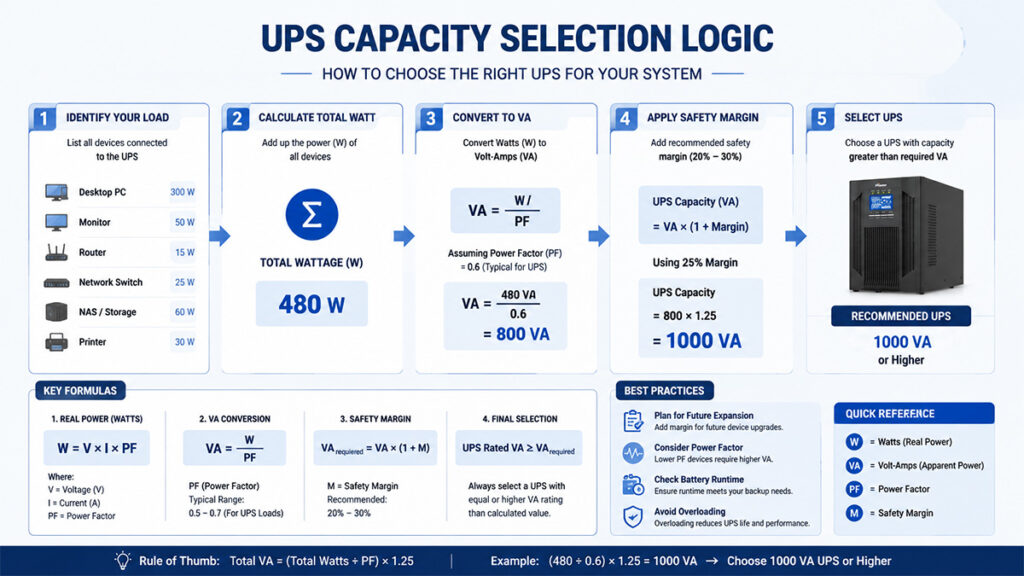
Step 2 — Calculate Your Total Load and Apply Safety Margin
Once you have your wattage inventory, sum all the values. This is your baseline load.
Formula:
Total Load (W) = Sum of all device watt draws
Required UPS Capacity (W) = Total Load × 1.25
Required UPS Capacity (VA) = Required UPS Capacity (W) ÷ UPS Power Factor
Worked example — Home office setup:
- Desktop PC: 260 W
- Two 27″ monitors: 50 W × 2 = 100 W
- Router + modem: 25 W
- External drive: 20 W
- Total load: 405 W
- With 25% Margin: 405 × 1.25 = 506.25 W
- Assuming a UPS power factor of 0.6: 506.25 ÷ 0.6 = 843.75VA minimum
In this case, a 1000 VA / 600 W UPS would be technically sufficient, but a 1500 VA / 900 W unit provides comfortable headroom for future expansion — a common recommendation among IT professionals.
Step 3 — Determine Your Required Runtime
Capacity and runtime are related but distinct decisions. A larger battery bank extends runtime at the same wattage, but adds cost and weight.
How to calculate runtime:
Most UPS manufacturers publish runtime charts on their product pages. The key formula is:
Runtime (minutes) ≈ [Battery Capacity (Wh) ÷ Load (W)] × Efficiency Factor (≈ 0.85–0.90)
Runtime targets by use case:
| Use Case | Recommended Runtime | Why |
|---|---|---|
| Home desktop / workstation | 5–15 minutes | Enough to save work and shut down gracefully |
| Small business / point of sale | 15–30 minutes | Covers short outages without shutdown |
| Network equipment (router, switch) | 30–60 minutes | Keeps connectivity during longer outages |
| Home server / NAS | 30–120 minutes | Allows safe RAID scrubbing and shutdown |
| Medical or life-critical devices | Consult a licensed electrician | Regulatory requirements apply |
This is one of the most frequently overlooked long-tail considerations in UPS buying decisions: users who only think about protecting their PC often forget that powering the router for an extra 30 minutes can mean the difference between working remotely during an outage and losing connectivity entirely.
Step 4 — Choose the Right UPS Topology
The term computer uninterruptible power supply UPS encompasses three distinct internal technologies. Choosing the wrong topology can mean your “protected” equipment still receives dirty or interrupted power.
Standby (Offline) UPS
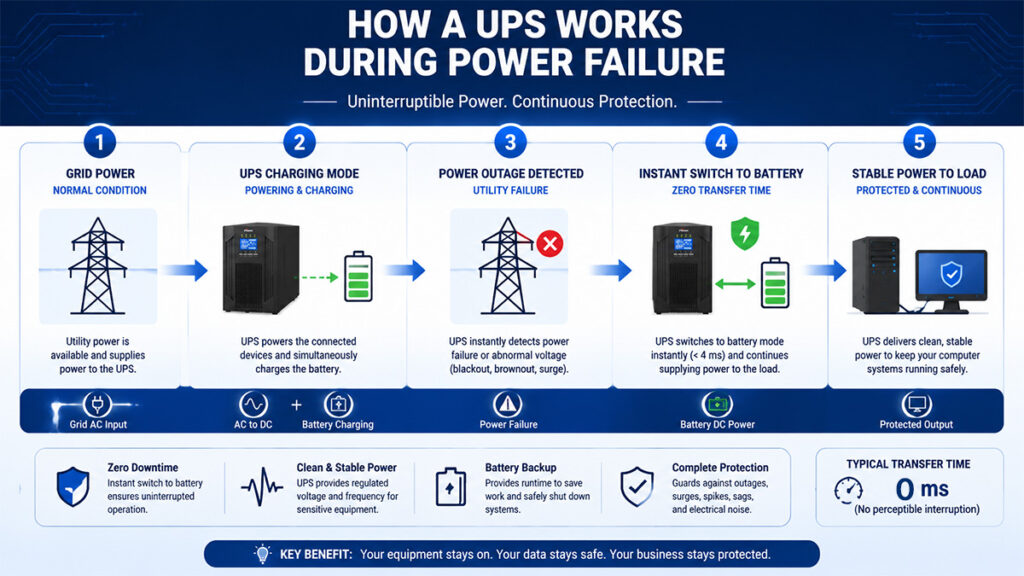
The most affordable type. The UPS passes utility power directly to connected devices and switches to battery only when voltage drops outside an acceptable range. Switchover time is typically 4–12 milliseconds — fast enough for most computers (which tolerate up to 20 ms).
Best for: Budget home office setups, general desktop computers, basic networking gear.
Limitation: Provides no filtering of power quality issues (sags, swells, harmonic distortion) while on utility power.
Line-Interactive UPS
Adds an automatic voltage regulator (AVR) that corrects minor voltage fluctuations without switching to battery. This is the most popular topology for home UPS for computer protection and small business use.
Best for: Areas with frequent voltage sags or brownouts. Ideal for most desktop computers, workstations, and NAS devices.
Key spec to check: The voltage regulation window (e.g., “corrects input from 80–150V to stable 120V output”).
Online Double-Conversion UPS
Utility power is continuously converted to DC and then back to AC via an internal inverter. The connected equipment always runs from battery-conditioned power; the batteries are simultaneously being charged. Zero transfer time on power failure.
Best for: Servers, high-end workstations, medical equipment, audio/video editing suites, and any equipment sensitive to power quality. Typically 2–3× the cost of line-interactive units at the same VA rating.
Limitation: Slightly lower efficiency (92–96%) compared to line-interactive, which can increase electricity costs over time.
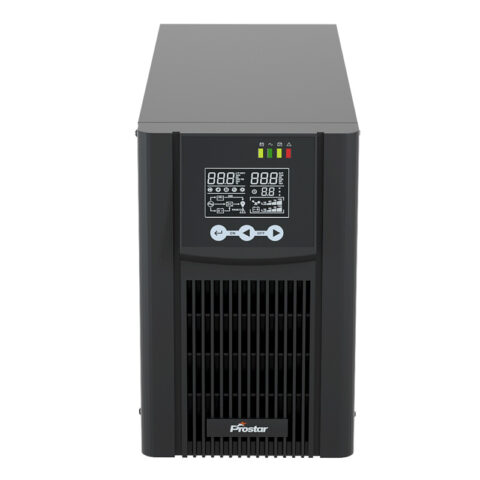
Related Computer Uninterruptible Power Supply UPS


Step 5 — Evaluate Battery Type and Replacement Cost
The chemistry of the battery inside a computer uninterruptible power supply UPS determines its runtime performance, lifespan, and total cost of ownership — yet this is rarely discussed in generic buying guides.
VRLA / AGM (Valve-Regulated Lead-Acid)
Found in the vast majority of consumer and small-business UPS models. Sealed, maintenance-free, and relatively inexpensive. Typical lifespan: 3–5 years at 20–25°C operating temperature. Battery life drops sharply above 30°C.
Total cost of ownership tip: Factor in battery replacement costs. A $150 UPS that requires a $60 battery replacement every 3 years has a 9-year TCO of approximately $330, not $150.
Lithium-Ion (Li-Ion)
Increasingly available in higher-end UPS models. Advantages include longer cycle life (5–10 years), lighter weight, faster recharge, and better performance at elevated temperatures. Premium pricing — typically 1.5–2× the cost of equivalent VRLA models — but lower TCO over a decade.
Best for: Installations where battery replacement is difficult (wall-mounted rack UPS, embedded in furniture), or environments above 25°C ambient temperature.
Common Sizing Mistakes and How to Avoid Them
Mistake 1: Sizing Based on VA Alone
A UPS rated 1500 VA with a 0.6 power factor delivers only 900 W of real power. If your load is 950 W, the UPS will overload. Always verify the watt rating.
Mistake 2: Ignoring Startup (Inrush) Current
Motors, laser printers, and air conditioners draw 3–7× their rated wattage at startup for a fraction of a second. A UPS must handle this inrush without tripping. Check manufacturer notes on inductive load compatibility if you plan to connect such devices.
Mistake 3: Not Accounting for UPS Aging
A brand-new battery at 100% capacity provides rated runtime. At 80% capacity (typically year 2–3 for VRLA), runtime shrinks proportionally. When buying, consider sizing up by 20–30% to account for realistic in-service battery degradation.
Mistake 4: Forgetting to Test
Every UPS battery backup for home computer setup should be tested quarterly. Simulate a power failure by unplugging the UPS from the wall while equipment is running. If the UPS does not sustain the load, the battery needs replacement. Many modern UPS models include automatic self-test functions and software-based alerts.
FAQ
Capacity (measured in VA or W) describes how much electrical load a UPS can support simultaneously. Runtime describes how long it can support that load on battery. A higher-capacity UPS does not automatically mean longer runtime — runtime depends on battery size (Wh). Two UPS units can have identical VA ratings but very different battery sizes.
For gaming PCs or workstations with GPUs drawing 300 W or more, calculate the full system load under gaming conditions — not idle. Use a power meter at peak load. A system that idles at 150 W may draw 650 W during a GPU-intensive task. Always size for peak, not average, load.
Watts determine real usable power, while VA defines total capacity. Watts is more operationally critical.
Overload shutdown, battery damage, and potential system crash during outages.
Yes, from a capacity perspective. A UPS with a power factor of 1.0 converts all its VA rating to usable watts, while one with a 0.6 power factor delivers only 60% as much real power. For a given VA size, a higher power factor means more usable capacity. Line-interactive and online double-conversion UPS models typically have power factors of 0.8–1.0.
The Articles You may Like
- Customizable UPS Solutions for Reliable Power Protection
- Stand-alone power system – Wikipedia
- What is the CT Sensor in Solar Inverter On Off Grid
- DSP Based Industrial UPS for Mission-Critical Loads
- Safeguard Your Electronics with a UPS Backup Power Supply for Home
- How to Choose 3 Phase Online UPS for Laser Cutting Machine
- Industrial ups power supply vs normal UPS